 LaunchRepo
The short answer
- One purchase covers an unlimited number of software products that you or your company own and operate.
- The catalog, the playbooks, the agent instructions and your Chrome connection are set up once and shared by every product.
- Each product gets its own folder with its own brief, launch-date floor and submission tracker, so results never mix.
- One local dashboard shows all products side by side and tells you which one needs you next.
- Launching products of clients is not part of the standard license. LaunchRepo is a toolkit for your own products, not an agency service.
What you set up once, and what each product gets
The second launch is faster because most of the work does not repeat. This is how the kit splits the work between your workspace and each product.
| Part | Set up | Where it lives |
|---|---|---|
| Directory catalog and platform playbooks | Once, shared by every product | Your private workspace |
| Agent instructions and start prompts | Once, shared by every product | Your private workspace |
| Chrome connection for your agent | Once per computer | Your own Chrome |
| Local dashboard | Once, shows all products | Your computer (127.0.0.1) |
| Product folder | Per product, created with “New product” | Copied from templates/project |
| Product brief and onboarding checks | Per product | The product folder |
| Launch-date floor | Per product | earliest_launch_date in product.json |
| Submission states and evidence | Per product, each platform once | The product’s tracker |
| License | Once, for every product you own | Your purchase |
Because states are stored per product, the same directory can be “live” for one product and “not a fit” for another. The catalog overlays one product’s status at a time.
One dashboard for every product
This is the real dashboard from the kit, not a mock-up. The overview answers “what needs me?” first, then shows every product with its setup progress, its submissions and the next step.
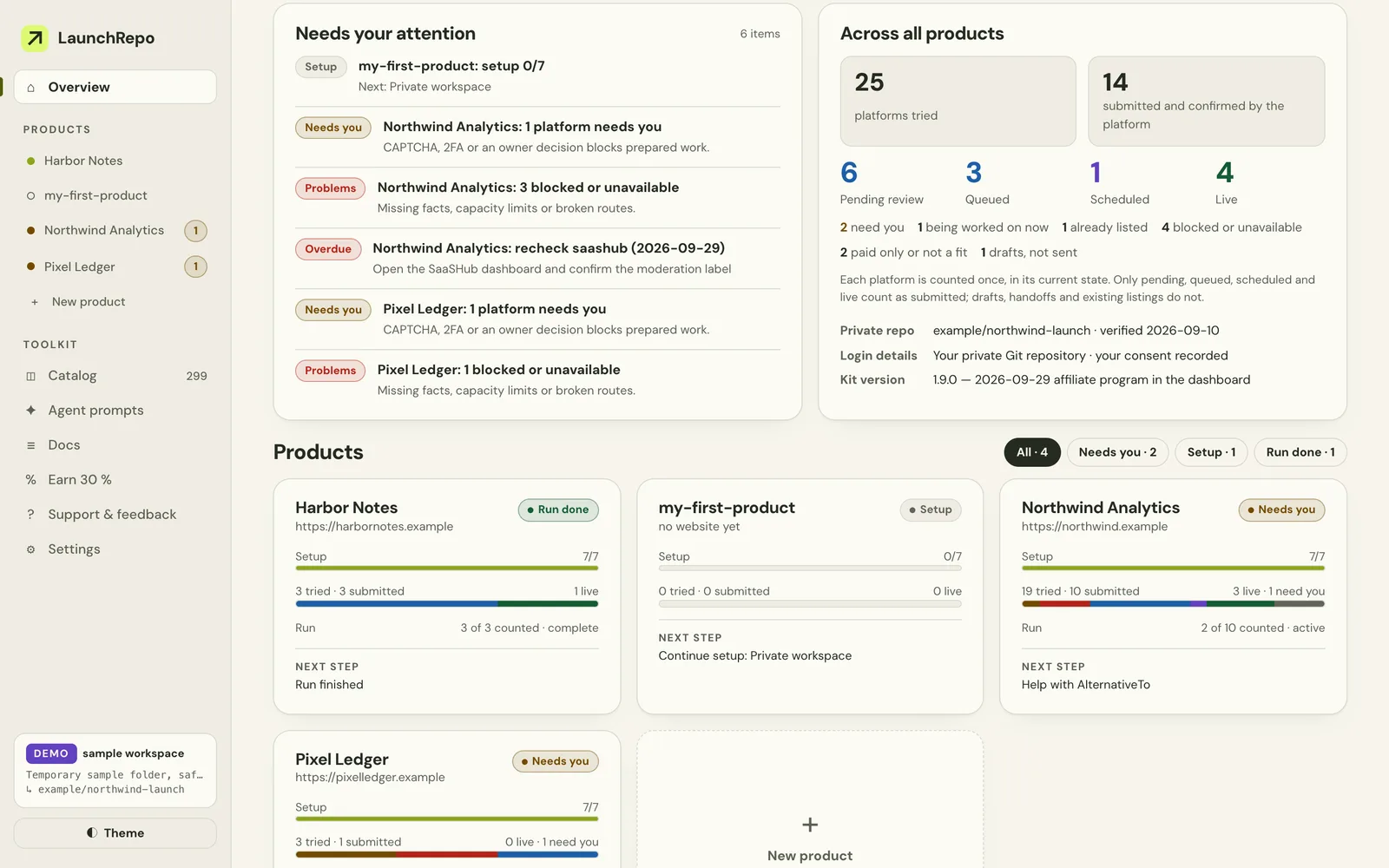
- Across all products: platforms tried, confirmed submissions and the current states, each platform counted once per product.
- Per product: setup progress, submissions, the saved run and the next step.
- Needs your attention: CAPTCHAs, two-factor codes, blocked routes and overdue re-checks, with the product named.
Our own run: the same setup, product after product
LaunchRepo started as the fix for our own launches, and we still use it that way. This is the sequence, with the numbers we have published.
By hand first
SeoMap was submitted to three directories by hand. After the third, there was no motivation left for a fourth.
SeoMap with the kit
The same work, run by a coding agent from playbooks and recorded in a tracker: 211 submission attempts logged from September 12, 2026. The log of September 14, 2026 showed 20 live, 97 pending review and 24 scheduled.
LaunchRepo itself
The second product reused everything that was already in place: catalog, playbooks, agent instructions and the Chrome connection. New were only its product folder, its brief and its tracker.
Every product after that
The same workspace and the same steps. Each new product starts with “New product” in the dashboard instead of a new setup.
Pending entries can still go live or be declined. Every platform decides for itself what it publishes, so your results will differ.
The SeoMap numbers on the founder page →
Launch directory status index →
Plan your next launches
Add the products you want to launch. The planner puts them into one run at a time, earliest launch-date floor first, and gives you a checklist to copy or download. It runs in your browser and sends nothing.
The run size follows the kit’s starting recommendation: 10 new confirmed submissions with one browser worker and a default budget of 150 active minutes. You can change it in the dashboard.
What the license covers
The repeat use is written into the terms, not just promised on this page. Here are the two relevant passages, word for word.
Included
With your purchase you receive a perpetual, non-exclusive, non-transferable licence to use this content for an unlimited number of software products that you or your company own and operate, with an unlimited number of your own AI agents or team members working on those products. You may clone the repository and keep your copy; access to the hosted repository is bound to one GitHub account that you connect after purchase.
Not included
You may not resell, rent, sublicense, publish or otherwise redistribute the repository or substantial parts of it, share your access with third parties, or use the content to build or operate a competing directory-submission product or service. Using LaunchRepo to launch products of clients or other third parties (for example as an agency) requires a separate licence; contact us.
From the Terms of Service, sections 2 and 3. Read the full terms →
Your SaaS is live. Give your agent a process to get it listed. →
Why we charge once: a founder's view on pay-once pricing →
Frequently asked questions
- Can I use LaunchRepo for more than one SaaS?
- Yes. One purchase gives you a license for an unlimited number of software products that you or your company own and operate, with as many of your own agents or team members as you like.
- Can I launch products for clients?
- Not with the standard license. Launching products of clients or other third parties, for example as an agency, needs a separate license. Ask us before you start.
- Do I pay again for each new product?
- No. You pay once and there is no fee per product or per year. Your AI agent’s usage is paid to your AI provider, as with any other agent work.
- What do I have to repeat for the second product?
- Only the product-specific part: a new product folder, its brief and onboarding checks, its launch-date floor and its own submissions. The catalog, the playbooks, the agent instructions and the Chrome connection are already in place.
- Can I run launches for two products in parallel?
- Start with one run and one browser worker at a time. Each product keeps its own saved run and progress, so you can finish one, switch to the next and resume where you stopped.
- Do the products share their results?
- No. Every product has its own tracker. The dashboard adds them up in its overview, but a directory that listed one product says nothing about the next one.
One setup for every product you build
Pay once, keep the kit and launch each new product from the workspace you already have.
See pricing