 LaunchRepo
Short answer
- The catalog starts with the route, not the name: every directory carries a dated status (free, conditional, unknown, unavailable), and only fresh, evidenced free routes enter a default run.
- Then comes your product. Your agent checks category fit and prerequisites such as a live product, real AI features or approved company facts.
- Before anything is submitted, it searches for an existing listing and confirms your permission for this product.
- What remains becomes a run of up to 10 new submissions with one browser worker. If fewer routes fit, the run is smaller, not padded.
- Every route ends up in one of five lanes, so you always see why a directory is in the run, waiting for a check or left out.
From catalog to queue
Four filters between a catalog and the run your agent starts. The counts come from the catalog snapshot of September 24, 2026, the same one our status index uses.
- Catalog299 active routes, each with a dated status and evidence. 50 routes that require payment were removed and are kept only for history.
- Route status86 are free without conditions and form the default inventory. 157 are free only if you meet every listed condition, 4 need research and 52 cannot be used right now.
- Fit for your productCategory, stage and prerequisites are checked against your product brief. A directory for AI tools needs real AI features; a company database needs facts you approved.
- Your runUp to 10 new confirmed submissions, one browser worker, existing listings and permission checked first. A smaller run is the correct result when fewer routes fit.
The counts describe routes, not your product. Which routes fit is decided per product. Launch directory status index →
Five lanes
Each route lands in exactly one lane for your product. The lane says what happens next.
| Lane | What it means | What happens next |
|---|---|---|
| In this run | Free route, fits your product, no existing listing, permission confirmed. | Enters the run. Your agent reads the playbook and works through it. |
| Needs a check first | The route works, but something about your product is not confirmed yet. | You confirm the missing fact, accept the conditions or let the agent check existing listings. |
| Route unclear | Price or availability of the route is unknown, incomplete or stale. | A short, time-boxed check, then a suitable alternative. It never enters the run silently. |
| Already in the tracker | Your tracker already has a record for this product here: submitted, queued, scheduled, live or a draft. | Follow up on that record. Never a second submission. |
| Left out | Mandatory payment, wrong category, wrong stage, missing prerequisite or blocked. | Stays out, with the reason recorded. |
How the run is ordered
- Fit with your product comes first.
- Dated audience evidence counts only when it was actually observed.
- SEO value counts only when sample listings were checked; unknown stays unknown and is never a reason to skip a good free route.
- Effort decides between equals.
Try the selection
Here is the same logic on ten example routes. They are route types, not real directories. Change the product above the table and watch the lanes change. Everything runs in your browser.
The demo lists unconditional ready routes first, then sorts by shorter effort. The product adds fit strength and dated evidence, as described above.
In the dashboard
This is where selection happens in the product: the local dashboard, shown here from the kit’s demo mode with a fictional sample product.
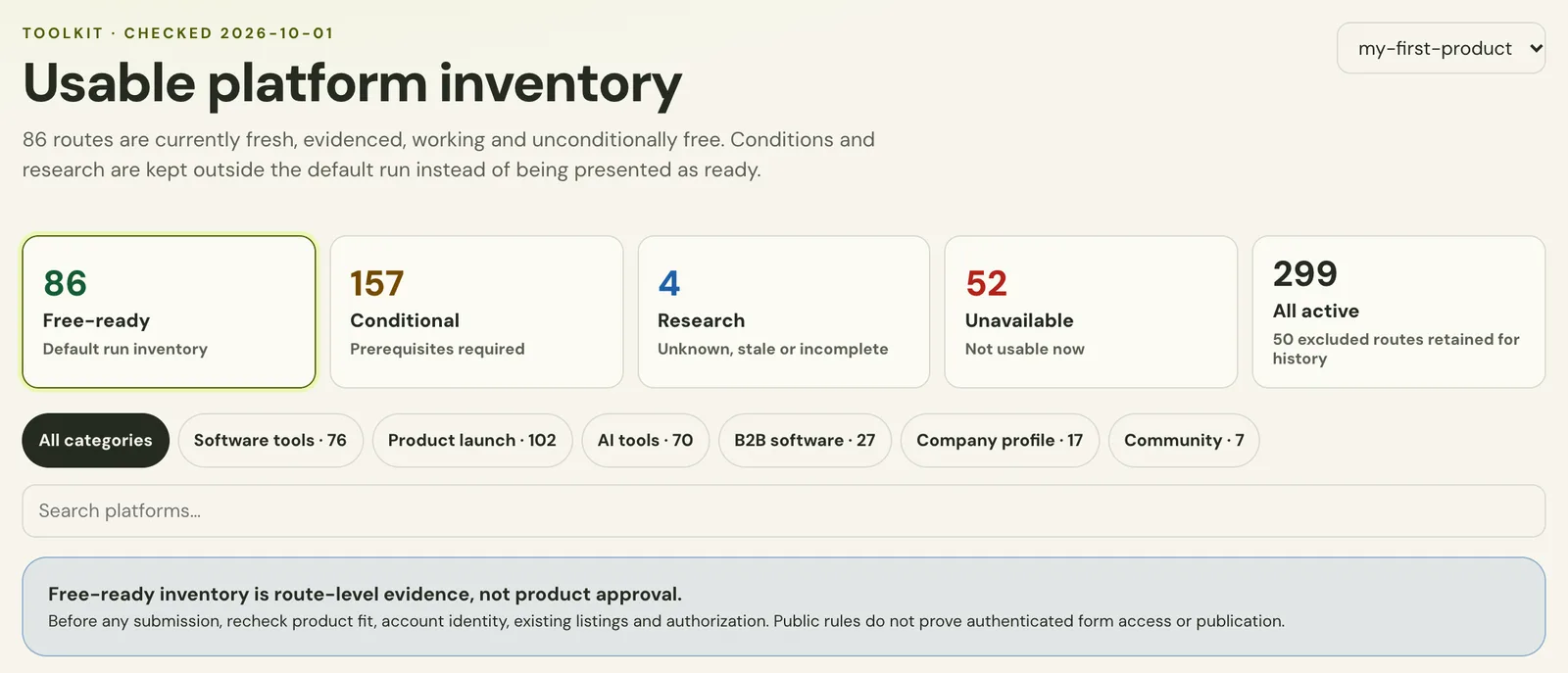
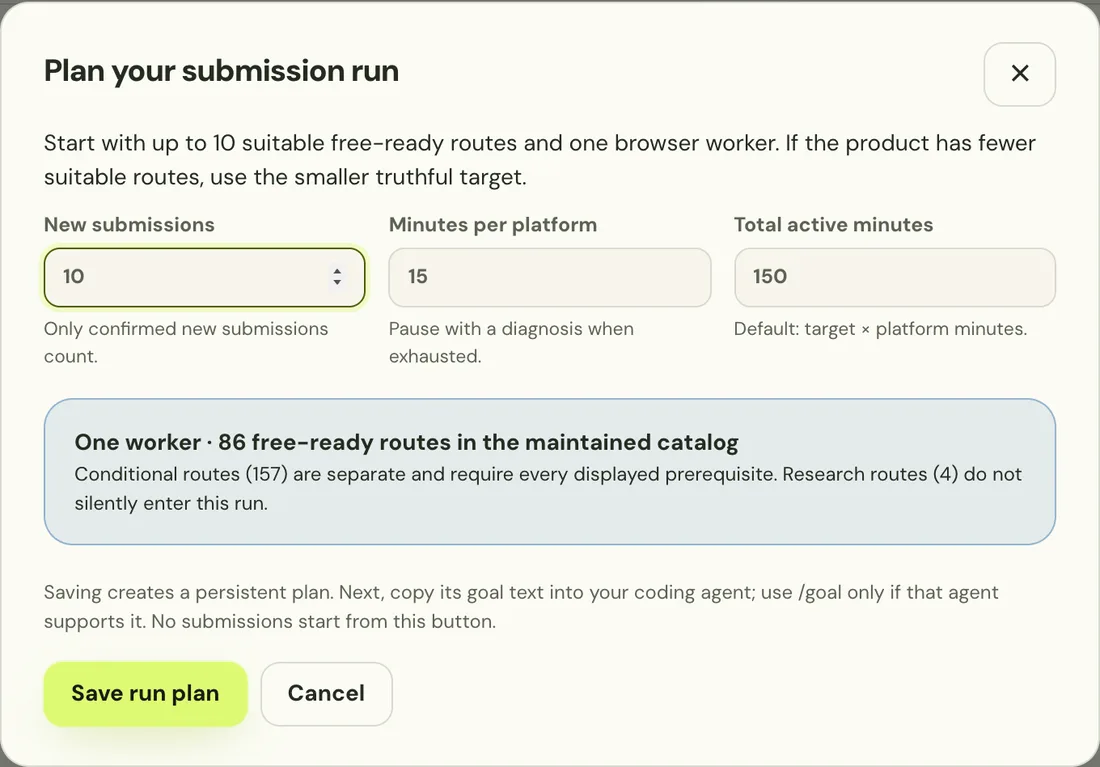
- The default view shows only free-ready routes. Conditional and research routes are one click away and never mixed in.
- With a product selected, every route shows that product’s status, so you see at once what is new and what needs a follow-up.
- The planner suggests 10, one worker and 15 minutes per platform. You can set lower values.
The local dashboard: your workspace, as the agent sees it →
Launch every product you own, again and again →
What selection never does
Selection makes the run smaller and better. It does not make promises it cannot keep.
- It does not rank directories by traffic or domain scores. Unknown SEO value stays unknown.
- It does not include paid listings. A route that requires payment is out of the catalog.
- It does not submit on its own. Your agent works the run, and you step in for CAPTCHAs and two-factor codes.
- It does not reuse permission. What you allow for one product does not apply to the next.
- It does not promise acceptance. Every directory decides for itself what it publishes.
Frequently asked questions
- Which directories should I submit my SaaS to?
- The ones with a working free route that fit your product’s category and stage, where you are not listed yet. LaunchRepo checks exactly that for each product and turns the result into a run of up to 10.
- Why not submit to every directory at once?
- Because many will not fit: wrong category, paid only, an AI-only rule, or you are already listed. Small runs keep each submission accurate and leave a clean record you can follow up on.
- Is there a SaaS directory selection tool that does this automatically?
- LaunchRepo does the route side automatically: dated status, free-ready inventory and lanes. The product fit, existing listings and your permission are checked by your own agent with you, because they depend on facts only you can confirm.
- What happens if fewer than 10 directories fit?
- The run gets smaller. The planner treats a smaller, truthful target as the correct result and never fills the run with routes that do not fit.
- Are conditional routes included?
- Only if you accept them. Each condition, such as a badge link or a waiting queue, is shown before any account or form work.
- Does LaunchRepo choose for products I launch again later?
- Yes. Each product has its own tracker, so routes that already list one product go to follow-up for that product only, and the next product gets its own selection.
Get a run that fits your product
Pay once and let your own agent work through a checked catalog, one fitting directory at a time.
See pricing