 LaunchRepo
Short answer
- Every platform gets one current state per product, chosen from what your agent actually saw: draft, needs you, pending review, queued, scheduled, live and five more.
- The tracker refuses claims without evidence. “Live” needs a public URL that you opened yourself, “scheduled” needs the platform’s date, and notes may not contain links or secrets.
- A run counts only new confirmations, once per platform. Drafts, handoffs, existing listings and paid routes never inflate the number.
- When your agent hits a CAPTCHA, a two-factor prompt or an unclear submit, the run pauses and the handoff is saved with the exact next step.
- Everything lives in plain files in your private repository. Any agent session can read them and continue without repeating a submission.
Eleven states
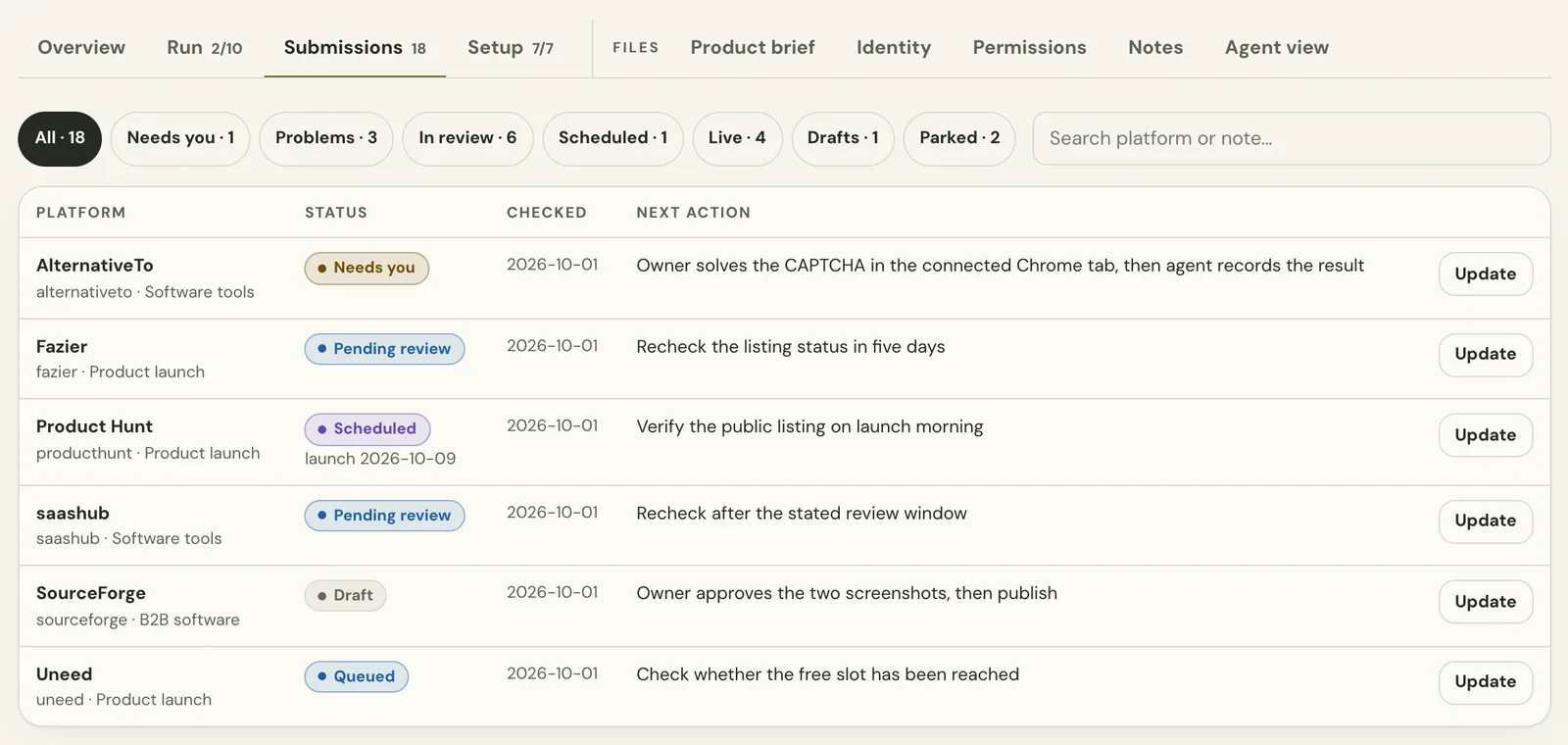
The kit knows 11 states. Each one needs a minimum observation before your agent may record it, and the dashboard groups them into the filters you see in the Submissions tab.
| State | Minimum observation | Counts toward a run | Dashboard filter |
|---|---|---|---|
Draftdraft | Work prepared; the final submission is not confirmed. | No | Drafts |
Needs youprepared_needs_human | A precise owner action or challenge blocks prepared work. | No | Needs you |
Pending reviewsubmitted_pending_review | The platform explicitly received the submission and moderation remains. | Yes, once | In review |
Queuedqueued | The platform confirms a queue position or waiting-list state. | Yes, once | In review |
Scheduledscheduled | The platform confirms a launch date on or after your earliest launch date. | Yes, once | Scheduled |
Livelive | Public listing verified without a pending label; public URL plus your confirmation. | Yes, once | Live |
Already listedalready_listed | An existing public listing verified; same URL and confirmation as live. | No | Live |
Blockedblocked | Eligibility, account capacity or a missing fact prevents progress. | No | Problems |
Paid onlydeferred_paid | The current route requires payment; nothing was bought. | No | Parked |
Not a fitnot_a_fit | The product does not meet the audience or listing criteria. | No | Parked |
Unavailableunavailable | The route cannot be used right now; the observed problem is noted. | No | Problems |
A thank-you screen is not a live listing, and a page you can open may still be pending. Each platform keeps its own result. Recording outcomes: states, evidence and record.py →
What counts
Run progress is a promise you can check. These rules come straight from the kit and apply in the dashboard and on the command line alike.
- Only new, confirmed outcomes count: pending review, queued, scheduled or live.
- Each platform counts once. Moving from review to live later is the same submission, not a second one.
- Everything already in the tracker when a run starts is excluded, including old drafts.
- An existing listing found during the run is recorded as already listed and never counts.
- An outcome counts only when the agent that holds the platform records it, so two sessions cannot count the same work.
- If a confirmation was recorded by mistake, an explicit correction removes it and reopens the run. A real submission that is later rejected stays counted.
Try the tracker
This is the same rule set on six example route types, not real directories. One of them was submitted in an earlier session. Record what your agent observed and watch the tracker, the run count and the timeline react. Everything runs in your browser.
Run
Run: 0 of 3 new confirmations counted (active)
- Needs you · 0
- In review · 1
- Scheduled · 0
- Live · 0
- Drafts · 0
- Problems · 0
- Parked · 0
Tracker for this product
| Platform | State | Counted |
|---|---|---|
| Startup database | Pending review | no |
What happened
- Run planned: 3 new confirmations. The startup database was submitted in an earlier session.
The demo keeps one assignment at a time and skips claims, windows and time budgets. The product adds those, as described below.
In the dashboard
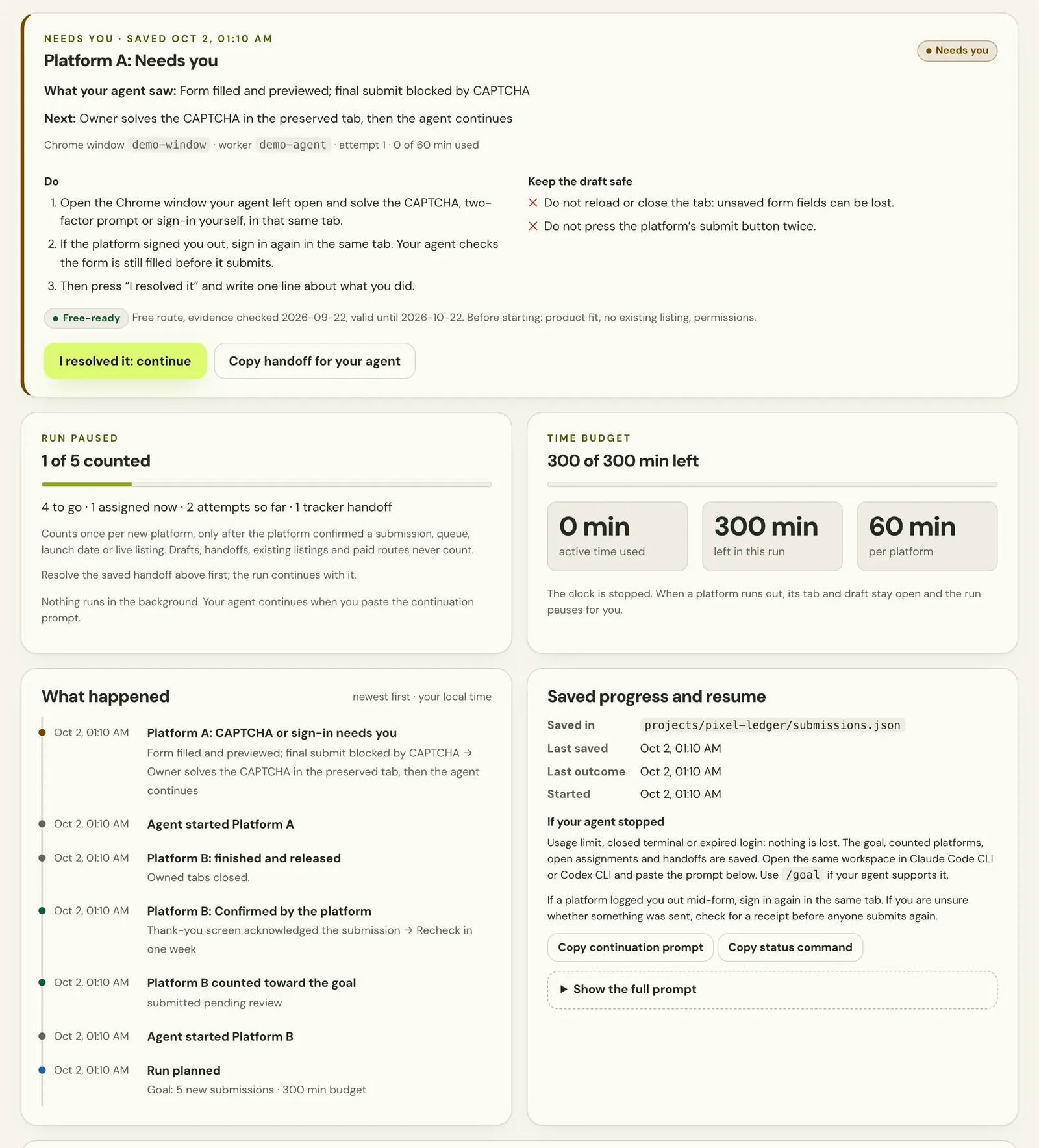
This is the real local dashboard from the kit’s demo mode, with fictional sample products. It reads the same files your agent writes.
Pause and resume
Agents stop: a usage limit, a closed terminal, an expired login. The tracker is built so that nothing is lost and nothing is sent twice.
- Saved as it happensEach result, assignment and handoff is written to the product’s tracker file right away, with timestamps and the next action.
- Pause instead of guessingA CAPTCHA, a saved draft or an unclear submit pauses the run and keeps the platform assigned, so no other session opens it.
- One clear owner actionThe handoff card says what the agent saw, what you should do, and how to keep the draft safe: do not reload, do not press submit twice.
- Continue the same assignmentAfter you resolve it, the same platform continues. For an unclear submit, the account is checked for a receipt first.
- Resume in any sessionOpen the workspace in a new agent session and paste the continuation prompt. It reads the tracker and the run before doing anything.
- Stale changes are refusedIf the dashboard page is older than the last save, a run change is refused, so a double click or an older tab never repeats work.
CAPTCHA and 2FA in agent workflows: the controlled handoff →
Spreadsheet or tracker
A spreadsheet works for a first launch, and our free template is a good start. A tracker that your agent writes, with rules it cannot skip, is what keeps the record true when work spans sessions and products.
| Question | Spreadsheet template | LaunchRepo tracker |
|---|---|---|
| Who writes it | You, after each step | Your agent, after each observed result; you review in the dashboard |
| Allowed states | Whatever you type | Eleven fixed states, each with a minimum observation |
| “Live” claims | Not checked | Need a public URL and your confirmation |
| Run progress | Counted by hand | Only new confirmations, once per platform |
| CAPTCHA and 2FA | A note, if someone remembers | Saved handoff that pauses the run |
| After an interruption | Read the sheet and guess | Continuation prompt from the saved state |
| Several products | One tab each | One tracker per product, one dashboard for all |
The template stays free. Use it to plan, or to track a launch without an agent. Launch tracker template to download →
Listing status →
What tracking never claims
The tracker records what was observed. It does not pretend to know more.
- It does not visit directories or verify listings by itself. A recorded state is your agent’s and your statement, backed by the evidence you saw.
- It does not promise acceptance, publication or a review time. Each platform decides that.
- It does not measure traffic, rankings or backlink value.
- It does not solve CAPTCHAs or two-factor prompts. You do, in the tab your agent left open.
- It does not keep a full audit log; it keeps the current state and the run. Archive summaries yourself if you need history.
Frequently asked questions
- What is the best way to track directory submissions?
- Record one current state per platform and product, based on what the platform actually showed, together with the next action and a check date. LaunchRepo does this with eleven fixed states, so “submitted”, “queued” and “live” never get mixed up.
- Is there directory submission tracker software that works with AI agents?
- Yes. LaunchRepo’s tracker is a set of plain files and scripts in your private repository. Claude Code, Codex, Cursor and other agents with file access write results through the same rules, and the local dashboard shows them to you.
- How does LaunchRepo avoid submitting the same product twice?
- Before a platform is opened, the tracker is read and existing listings are searched. A platform already in the tracker goes to follow-up, an unclear submit is checked for a receipt first, and a held platform cannot be claimed by another session.
- What happens when my agent hits a CAPTCHA?
- It stops, records a handoff with the exact next step and pauses the run. You solve the challenge in the same tab, press continue in the dashboard, and the same assignment carries on.
- Where is my tracking data stored?
- In your own private repository, in one tracker file per product. The dashboard runs on your machine at 127.0.0.1 and never sends your data anywhere.
- Can I see all my products in one place?
- Yes. Each product keeps its own tracker, and the dashboard overview shows every product with its next step and what needs you.
Keep every submission on record
Pay once and let your own agent work through a checked catalog, with a tracker that tells you the truth at every step.
See pricing