 LaunchRepo
Short answer
- Put the chrome-devtools entry under the "mcp" key of opencode.json, with "type": "local" and the whole command as one array. The block is below.
- OpenCode 1.18.34 loaded it from the global file, from a project opencode.json (also when started in a subfolder), from .opencode/opencode.json and from both environment variables.
- It then offered 30 browser tools named chrome-devtools_… and passed the full 44,167-character page snapshot to the model without shortening it.
- After a CAPTCHA or 2FA step, resume the same conversation with opencode run --session <session-id>. That worked headless in every run: same tab, same fields, one submission.
- OpenCode allows most actions by default, so add one permission line if you want to approve browser actions yourself.
LaunchRepo works with any coding agent that can read and write files in your workspace and control a browser. OpenCode does both. This page documents a tested setup; it is not a certification or partnership.
Add the browser to opencode.json
OpenCode merges its config files instead of replacing them. That makes setup safe: you add one key and every setting you already have stays as it is.
- Open opencode.json in the root of your LaunchRepo workspace, or create it. For all projects at once, use ~/.config/opencode/opencode.json instead.
- Add the "mcp" block below next to your existing keys. If the file already has an "mcp" key, add only the chrome-devtools entry inside it.
- In the Chrome you launch from, open chrome://inspect/#remote-debugging and enable remote debugging (Chrome 144+). That is what --autoConnect connects to.
- Run opencode mcp list. A working entry shows the line below; then ask OpenCode to open https://example.com and read the page title.
Add to opencode.json
{
  "$schema": "https://opencode.ai/config.json",
  "mcp": {
    "chrome-devtools": {
      "type": "local",
      "command": [
        "npx",
        "-y",
        "chrome-devtools-mcp@1.10.1",
        "--autoConnect",
        "--no-usage-statistics",
        "--no-performance-crux"
      ]
    }
  }
}
Expected line in opencode mcp list opencode mcp list
✓ chrome-devtools connected--autoConnect uses the Chrome you already run. For a separate Chrome just for launches, use --browser-url=http://127.0.0.1:9222 instead; that is how our test connected to its temporary Chrome.
Keep your own settings
- Never paste the block over a whole existing file. Add the key; OpenCode merges files, so your provider, model and other servers stay.
- A project opencode.json overrides the global file only for the keys it sets. In our test a project file holding only "mcp" kept the global model and provider active.
- To switch the browser off for one project without touching the global file, set "enabled": false for chrome-devtools in that project. That worked in all runs.
Which config files OpenCode loads
Same server entry, different places and shapes. “Loaded” means the chrome-devtools_… tools reached OpenCode’s request to the model.
| Variant | File or variable | Result |
|---|---|---|
| Global config file | ~/.config/opencode/opencode.json | Loaded, 30 tools (3/3) |
| Global JSONC file with comments and a trailing comma | ~/.config/opencode/opencode.jsonc | Loaded, 30 tools (3/3) |
| Project file in the workspace root | opencode.json | Loaded, 30 tools (3/3) |
| Project file, OpenCode started in a subfolder | opencode.json | Loaded, 30 tools (3/3) |
| Inside the .opencode folder | .opencode/opencode.json | Loaded, 30 tools (3/3) |
| Custom file through an environment variable | OPENCODE_CONFIG=<file> | Loaded, 30 tools (3/3) |
| Inline JSON through an environment variable | OPENCODE_CONFIG_CONTENT | Loaded, 30 tools (3/3) |
| "mcpServers" block copied from Claude Code or Cursor | opencode.json | Not loaded, no error (3/3) |
| "command": "npx" plus "args" (the shape most other agents use) | opencode.json | Config rejected, OpenCode stops with exit code 1 (3/3) |
| Entry with "enabled": false | opencode.json | Not loaded, no error (3/3) |
| Global entry, project file sets only "enabled": false | opencode.json | Not loaded, no error (3/3) |
The two rows that bite: a pasted "mcpServers" block is ignored without a word (opencode mcp list says “No MCP servers configured”), and a string command stops OpenCode before it starts (“Expected array, got "npx"”). Both are fixed by the array form above.
The handoff run, step by step
OpenCode 1.18.34 with Chrome DevTools MCP 1.10.1, Google Chrome 154.0.8037.92, macOS, Node 22, on October 1, 2026. Every run used a fresh home directory and a fresh Chrome profile, so no personal settings were read or changed.
No AI model was involved. A small local stand-in answered OpenCode’s model requests with fixed tool calls and read element IDs only from what OpenCode actually sent it. That makes every run identical and free and tests what OpenCode controls: config, tools, what the model sees, permissions and sessions. It does not test how well a model plans.
Handoff run on the demo form of our CAPTCHA guide: 5 runs. Config variants: 3 runs each.
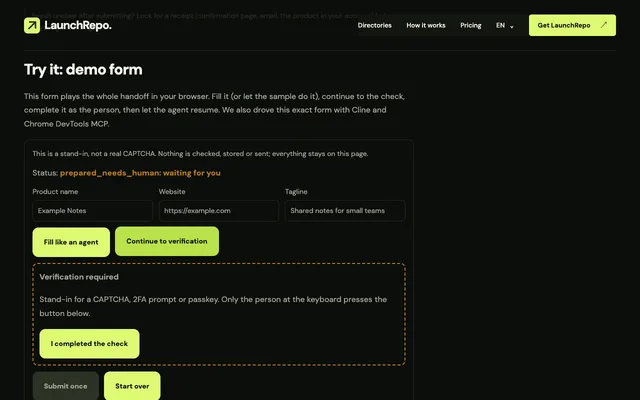
OpenCode opened the demo form, filled it, stopped at the stand-in check and ended the run. A script played the person and completed the check in the same tab. Then a second opencode run with --session continued the same conversation and finished. CAPTCHA and 2FA in agent workflows: the controlled handoff →
| Check | Runs passed |
|---|---|
| opencode mcp list shows the server as connected | 5/5 |
| Chrome DevTools tools offered to the model | 5/5 |
| Full page snapshot reaches the model with default settings | 5/5 |
| Opens the demo form in the connected Chrome | 5/5 |
| Fills three fields and reads them back | 5/5 |
| Stops at the check, status prepared_needs_human | 5/5 |
| Tab and filled fields survive the end of the run | 5/5 |
| Session ID appears in opencode session list | 5/5 |
| Person completes the check in the same tab | 5/5 |
| opencode run --session continues the same session | 5/5 |
| Continued session still has the earlier steps | 5/5 |
| Continued run finds and selects the same tab | 5/5 |
| Fields unchanged after the pause | 5/5 |
| Submits exactly once | 5/5 |
| Headless run with "ask": browser call rejected, no prompt | 5/5 |
| Same rule with --auto: browser call runs | 5/5 |
| "deny": browser tools removed from the model’s list | 5/5 |
| Headless run: no question tool offered to the model | 5/5 |
| Headless run with stdin left open: waits until stopped after 20 s | 3/3 |
Resume after the person finished
Every opencode run prints its session ID in --format json output, and opencode session list --format json lists it too.
Continue with the same ID. In our runs the continued session had every earlier step, found the same tab through Chrome DevTools MCP, saw the fields unchanged and submitted once.
Prefer the terminal UI? opencode --session <session-id> opens the same conversation there.
- Find the session
opencode session list --format json- Continue headless
opencode run --session <session-id> "The check is done. Re-read the form and submit once."- Continue in the terminal UI
opencode --session <session-id>
Approvals: ask, allow, deny
Without a permission block, OpenCode runs browser tools without asking. One line changes that. We ran each rule headless, the way scripts call OpenCode:
| Rule | In a headless opencode run |
|---|---|
"chrome-devtools_*": "ask" | Rejected straight away with “The user rejected permission to use this specific tool call.” The run still exits with code 0. |
Same rule plus --auto | The browser call runs. Explicit deny rules still apply, according to the docs. |
"chrome-devtools_*": "deny" | The browser tools disappear from the model’s tool list. |
Approve every browser action yourself
{
  "permission": {
    "chrome-devtools_*": "ask"
  }
}
Use "ask" in the terminal UI, where OpenCode offers once, always or reject. For headless runs, either accept that "ask" blocks the browser or use --auto knowingly, on a Chrome profile meant for launches.
Coming from Claude Code
The server is the same, the config is not. Four differences decide whether your entry works:
| Topic | OpenCode | Claude Code |
|---|---|---|
| Where the entry lives | "mcp" key in opencode.json | "mcpServers" in .mcp.json |
| Command shape | "command" is one array, plus "type": "local" | "command" string plus "args" array |
| Tool names in rules | chrome-devtools_take_snapshot | mcp__chrome-devtools__take_snapshot |
| Default approvals | Most actions allowed | Asks on first use of each tool |
Three things that cost time
- A pasted "mcpServers" block is silent
- OpenCode ignores the key entirely: no error, exit code 0, no browser tools. Move the entry under "mcp" and turn the command into one array.
- Headless runs wait on open stdin
- When a script starts opencode run with stdin left open as a pipe, OpenCode waits for input that never comes. In all 3 runs it hung until stopped; with stdin from /dev/null it answered at once.
- "ask" means no in scripts
- There is nobody to answer in a headless run, so every "ask" becomes a rejection. Decide per run whether the browser may act alone.
| Topic | Wording | What we observed |
|---|---|---|
| OpenCode: local servers | Add local MCP servers using type to "local" within the MCP object. | The "type": "local" plus array form loaded in every run. |
| OpenCode: several files | Configuration files are merged together, not replaced. | Confirmed: a project file with only "mcp" kept the global model and provider. |
| OpenCode: which file wins | Project config has the highest precedence among standard config files - it overrides both global and remote configs. | Confirmed: a project "enabled": false switched off the global entry. |
| OpenCode: tool names | MCP server tools are registered with server name as prefix | The tools arrived as chrome-devtools_take_snapshot and so on. |
| OpenCode: default permissions | If you don’t specify anything, OpenCode starts from permissive defaults: | Browser tools ran without a prompt until we added a rule. |
| OpenCode: --auto | Explicit "deny" rules are still enforced. | We tested --auto with "ask"; with "deny" the tools were not offered at all. |
| OpenCode: context size | MCP servers add to your context, so you want to be careful with which ones you enable. | Chrome DevTools MCP adds 30 tools. Keep other servers off while you launch. |
| OpenCode: --session flag | Session ID to continue | Worked headless in every run, unlike agents that resume only in their terminal UI. |
| Claude Code: project file | Project-scoped servers enable team collaboration by storing configurations in a .mcp.json file at your project’s root directory. | Different file and key from OpenCode; the same entry does not carry over. |
| Claude Code: tool names in rules | mcp__puppeteer__* matches every tool from the puppeteer server | OpenCode uses a single underscore after the server name instead. |
| Claude Code: default mode | Prompts for permission on first use of each tool. | OpenCode’s default is the opposite: allow, unless you set a rule. |
| Chrome DevTools MCP: OpenCode section | Add the following configuration to your `opencode.json` file. | Same shape as our block; we pin the version and add --autoConnect. |
Start LaunchRepo in OpenCode
Open OpenCode in your LaunchRepo private workspace and paste the start prompt. The kit then leads onboarding, tests your Chrome connection on Example Domain and builds the run.
- The start prompt recommends Claude Code or Codex CLI for the best results. OpenCode works with the same kit because it has the two things the kit needs: file access in the workspace and a browser through MCP.
- OpenCode reads AGENTS.md from the workspace, so it picks up the kit’s rules on its own.
- CAPTCHA and 2FA steps come back to you as handoffs; you resume the session with --session as shown above.
LaunchRepo start prompt
Recommend Claude Code CLI or Codex CLI in a terminal instead of the desktop apps for best results. If session metadata confirms desktop hosting, explicitly advise me to switch to the CLI and resume this same private workspace. Do not infer the host from a CLI engine version alone.

Read AGENTS.md, then follow "Start the dashboard for the owner". Create my private
workspace if I do not have one yet, start the dashboard, and give me the link.
Then lead ONBOARDING.md one phase at a time. Reuse recorded permissions instead of
asking again unless their scope is missing or conflicting. Actually test my visible
existing Chrome profile and intended identity as BROWSER-SETUP.md requires; use the
OS fallback if needed. Use one platform/browser worker by default. Build the normal
run only from suitable free-ready routes, keep research separate, and preserve any
draft that needs one exact human CAPTCHA/2FA action. Never claim browser control
bypasses or reduces those challenges.Not covered by this test
- The terminal UI’s approval prompts and question tool. The headless behavior above is measured; the UI behavior follows the docs.
- A real AI model. The stand-in removes model quality from the result; a model can still pick a wrong element.
- --autoConnect to an everyday Chrome profile. We used a temporary Chrome through --browser-url.
- Windows and Linux, remote MCP servers, OpenCode accounts and paid model plans.
Sources
Every quote above is copied word for word from these pages, read on October 1, 2026. Tested behavior comes from our own runs described on this page.
FAQ
- Where do I put MCP servers in OpenCode?
- Under the "mcp" key of opencode.json, either in your project root or in ~/.config/opencode/opencode.json. In our test OpenCode 1.18.34 also loaded .opencode/opencode.json, OPENCODE_CONFIG and OPENCODE_CONFIG_CONTENT.
- What is the OpenCode config for Chrome DevTools MCP?
- An entry named chrome-devtools with "type": "local" and "command": ["npx", "-y", "chrome-devtools-mcp@1.10.1", "--autoConnect", "--no-usage-statistics", "--no-performance-crux"]. Run opencode mcp list to see it connected.
- Why does OpenCode not show my MCP server?
- Most often the entry was copied from another agent: an "mcpServers" block is ignored without an error, and "command": "npx" with separate "args" makes OpenCode reject the whole config. Use "mcp" and one command array.
- Can I use Playwright MCP instead?
- Yes, the same "mcp" entry shape works for any local MCP server. This page tests Chrome DevTools MCP because it attaches to the Chrome you already use; our comparison page explains when Playwright MCP is the better fit.
- How do I resume an OpenCode session after a CAPTCHA?
- Complete the check in the same Chrome tab, then run opencode run --session <session-id> with a short instruction, or open it in the terminal UI with opencode --session <session-id>. In our runs the session, tab and fields were all still there.
- Is OpenCode officially supported by LaunchRepo?
- LaunchRepo supports coding agents that have file and browser access; OpenCode has both, and this page documents a tested setup. It is not a certification or partnership, and the start prompt still recommends Claude Code or Codex CLI for the best results.
Give OpenCode a launch plan
LaunchRepo gives your agent the platform list, the runbook and a tracker it keeps up to date. OpenCode does the work in your browser; you keep the final say.
See pricing