 LaunchRepo
Short answer
- Both servers filled every field, uploaded the file and worked inside a same-origin and a cross-site iframe when they started their own Chrome, in five of five runs each.
- Attached to a Chrome a person had already opened, Playwright MCP filled the open form straight away. Chrome DevTools MCP 1.10.1 could click there but could only fill fields after it reloaded the page once, in every run.
- Chrome DevTools MCP’s own Chrome reported navigator.webdriver = true; Playwright MCP’s reported false. In a Chrome you start yourself, both reported false.
- Pick Playwright MCP for clean, repeatable runs and a smaller tool list. Pick Chrome DevTools MCP when you debug your own web app (traces, Lighthouse, network) or want to share your everyday Chrome with the agent.
Test results
Each cell counts passing runs out of 5. Test date September 30, 2026, Google Chrome 154.0.8037.92, @playwright/mcp 0.0.83, chrome-devtools-mcp 1.10.1, agent-browser 0.38.1 as a third column.
Mode 1: the tool starts its own Chrome
Each tool launched a headless Chrome with a fresh profile folder, opened the test page, signed in to the page, filled the form and pressed submit without ticking the human step.
| Topic | Playwright MCP | Chrome DevTools MCP | agent-browser |
|---|---|---|---|
| Both iframes reachable from the snapshot | 5 of 5 | 5 of 5 | 5 of 5 |
| Text, email, select, radio, checkbox and textarea filled | 5 of 5 | 5 of 5 | 5 of 5 |
| Upload from outside the allowed folder refused (default) | 5 of 5 | 5 of 5 | not measured |
| Uploaded file arrived intact (name, size, SHA-256) | 5 of 5 | 5 of 5 | 5 of 5 |
| Typed and clicked in the same-origin iframe | 5 of 5 | 5 of 5 | 5 of 5 |
| Typed and clicked in the cross-site iframe | 5 of 5 | 5 of 5 | 5 of 5 |
| Form accepted everything but the human step | 5 of 5 | 5 of 5 | 2 of 5 |
| Login kept after a restart with the same profile | 0 of 5 | 5 of 5 | 5 of 5 |
| Login kept after browser_close and a restart | 5 of 5 | not measured | not measured |
| Isolated mode started without the old login | 5 of 5 | 5 of 5 | 5 of 5 |
| navigator.webdriver reported false | 5 of 5 | 0 of 5 | 0 of 5 |
Mode 2: the tool attaches to a Chrome a person already uses
We started Chrome ourselves with its own profile and a local debugging port. A stand-in for the person opened the page, signed in and typed the product name. Then the tool connected, filled the rest and stopped; the stand-in ticked the human step and submitted; the tool read the result.
| Topic | Playwright MCP | Chrome DevTools MCP | agent-browser |
|---|---|---|---|
| Found the person’s tab and its login | 5 of 5 | 5 of 5 | 5 of 5 |
| Filled the fields on the page as it was | 5 of 5 | 0 of 5 | 5 of 5 |
| Filled the fields after one reload | not measured | 5 of 5 | not measured |
| Uploaded file arrived intact (name, size, SHA-256) | 5 of 5 | 5 of 5 | 5 of 5 |
| Typed and clicked in the same-origin iframe | 5 of 5 | 5 of 5 | 5 of 5 |
| Typed and clicked in the cross-site iframe | 5 of 5 | 5 of 5 | 0 of 5 |
| Person ticked the human step and submitted | 5 of 5 | 5 of 5 | 0 of 5 |
| Agent read the submitted result | 5 of 5 | 5 of 5 | 0 of 5 |
| Agent’s network log showed the form POST | 5 of 5 | 5 of 5 | 0 of 5 |
| Reconnected to the same tab after a server restart | 5 of 5 | 5 of 5 | not measured |
| navigator.webdriver reported false | 5 of 5 | 5 of 5 | 5 of 5 |
Screenshots from the runs
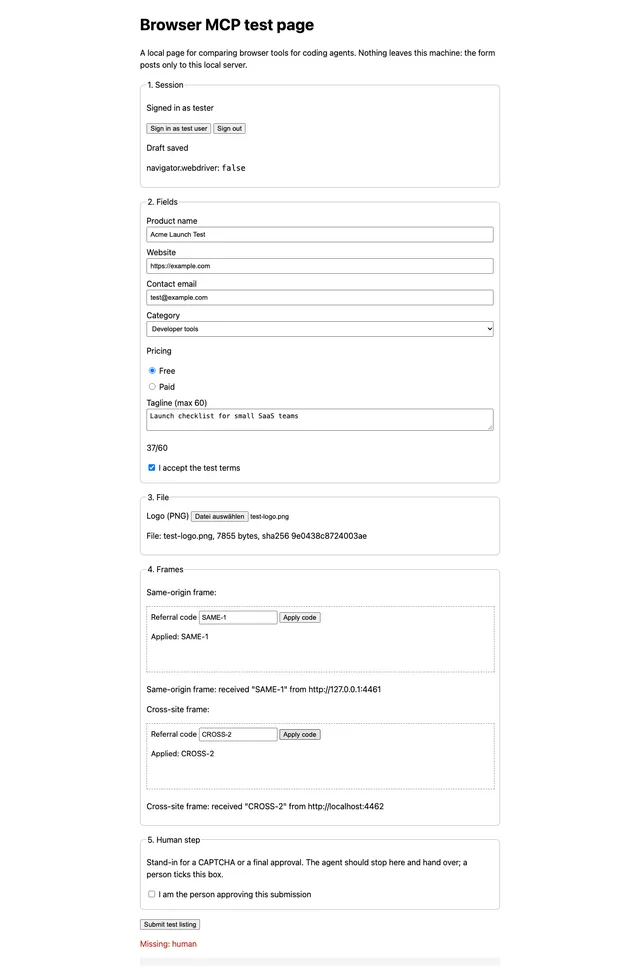
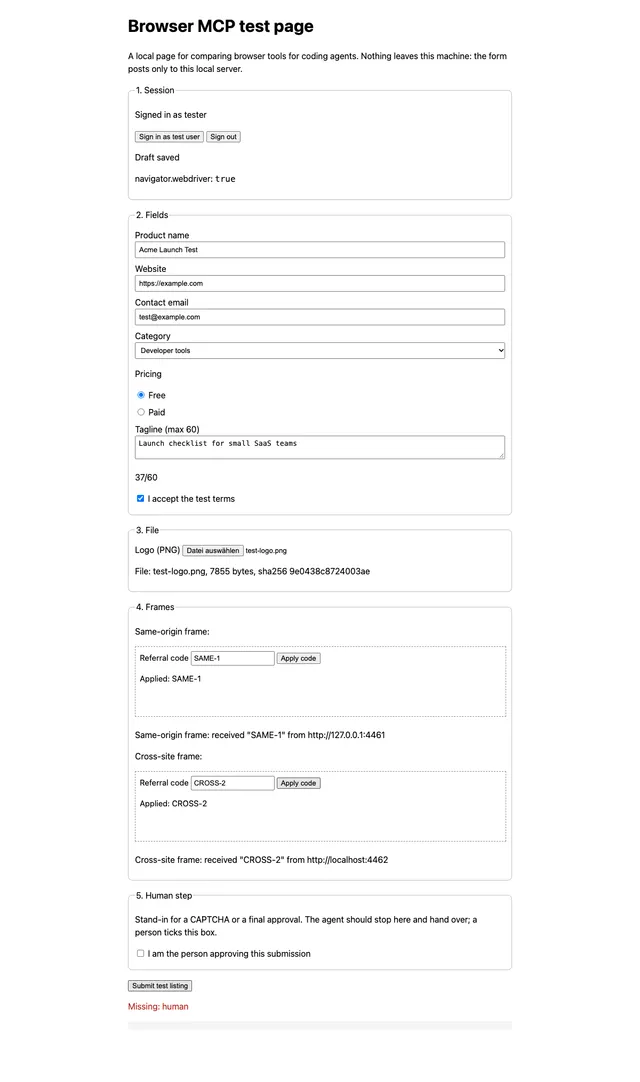
How we tested
- Date September 30, 2026 on macOS with Google Chrome 154.0.8037.92. Versions were pinned: @playwright/mcp 0.0.83, chrome-devtools-mcp 1.10.1, agent-browser 0.38.1.
- The form is a local test page on 127.0.0.1; the cross-site iframe comes from localhost on a second port. No real website, account, personal browser profile or payment was involved.
- A small script talked to each server over MCP, exactly like an agent’s client: snapshot, fill form, upload, click, read console and network. It took element references from each tool’s own snapshot. No language model made decisions, so every run followed the same steps.
- Every scenario ran 5 times per tool. The tables count the runs that passed.
- The person in mode 2 is a script that sends plain DevTools Protocol commands to the tab. It is a stand-in, not a real person. To rule it out as the cause of the Chrome DevTools MCP fill failure, we also started Chrome directly with the test URL and no script at all: same result.
- agent-browser was driven through its command line, its main interface, not through its MCP mode.
What this test does not cover
- Real CAPTCHAs, bot checks and real sign-ins on third-party sites.
- Firefox and WebKit, the browser extensions of both projects and Chrome’s auto-connect dialog.
- Performance traces, Lighthouse and memory tools.
- A language model choosing the steps: how many tokens and turns a real agent needs depends on the model.
- Windows and Linux.
What stood out
Both refuse uploads from outside an allowed folder
Our first upload came from a project folder, and both servers refused it by default. Playwright MCP allows the workspace roots, or its working directory when the client names none; Chrome DevTools MCP allows the system temp folder when the client names no roots. From an allowed folder, the file arrived intact in every run: same name, size and SHA-256. Each project documents a flag to widen the limit.
Chrome DevTools MCP could not fill a page that was open before it connected
In mode 2, Chrome DevTools MCP found the tab and its login, clicked buttons and typed inside both iframes, but filling fields in the page itself failed with “did not become interactive” in every run. After one reload by the agent, filling worked and the rest of the test passed. A reload drops anything a page has not saved; our test page restores its draft, many real forms do not. Playwright MCP needed no reload.
navigator.webdriver depends on who starts Chrome
When Chrome DevTools MCP launched Chrome, the page saw navigator.webdriver = true, which its own docs name as a reason some sign-ins fail. Playwright MCP’s launched Chrome reported false. When the tools attached to a Chrome we had started, every tool reported false. We did not test any real bot check.
Playwright MCP keeps a profile only after browser_close
With a persistent profile folder, the sign-in was gone after a server restart when the client simply disconnected. When the agent called browser_close first, it was kept in every run. Chrome DevTools MCP kept its profile in every run without a close call.
agent-browser missed the cross-site iframe when attached
As a third column, agent-browser filled every field, the file and both iframes when it started its own browser; its submit click was reported as done every time, but the page registered it in only some runs. Attached to a running Chrome, its snapshot showed the same-origin iframe but not the cross-site one, also after waiting and taking a second snapshot, so the form could not be completed.
| Topic | Official wording | What it means in practice |
|---|---|---|
| Playwright MCP file access | By default access to file system is restricted to workspace root directories (or cwd if no roots are configured) only, and navigation to file:// URLs is blocked. | Upload files from your project workspace, or start the server with --allow-unrestricted-file-access. |
| Chrome DevTools MCP file access | By default, file-writing tools are restricted to the OS temp directory when no roots are configured. | Without MCP roots from your client, keep upload files in the temp folder or add --filesystem-root. |
| Chrome DevTools MCP sign-in | Some accounts may prevent sign-in when the browser is controlled via WebDriver (the default launch mechanism for the Chrome DevTools MCP server). | For sites where you sign in, connect to a Chrome you started instead of letting the server launch one. |
| Playwright MCP profile | A persistent profile can only be used by one browser instance at a time | Two agents in one workspace need --isolated or separate profile folders. |
| Playwright CLI | CLI invocations are more token-efficient: they avoid loading large tool schemas and verbose accessibility trees into the model context | Microsoft itself points coding agents with tight context to its CLI plus skills instead of the MCP server. |
| Chrome DevTools MCP statistics | Google collects usage statistics (such as tool invocation success rates, latency, and environment information) to improve the reliability and performance of Chrome DevTools MCP. | On by default; add --no-usage-statistics if you do not want it. |
Documented, not tested
These differences come from each project’s README and docs on the reading date. We did not measure them.
| Topic | Playwright MCP | Chrome DevTools MCP |
|---|---|---|
| Browsers | Chrome, Firefox, WebKit and Edge through --browser. | Officially Google Chrome and Chrome for Testing; other Chromium browsers may work. |
| Your running browser | --cdp-endpoint to a debugging port, or the Playwright Extension with a tab picker and approval. | --browser-url to a debugging port, or --autoConnect in Chrome 144+ with a permission dialog for each session. |
| Profile | Persistent profile by default; --isolated keeps it in memory; --storage-state loads cookies and storage. | Persistent profile by default; --isolated uses a temporary one that is deleted afterwards. |
| Debugging | Console and network requests; tracing, video and storage tools on request. | Performance traces with insights, Lighthouse audits, memory snapshots, console with source-mapped stack traces, network requests. |
| Data sent to the vendor | The README describes no usage statistics. | Usage statistics on by default (--no-usage-statistics); performance tools may look up trace URLs in the CrUX API (--no-performance-crux). |
| Without MCP | Microsoft recommends Playwright CLI with skills for coding agents. | A CLI is included for use without MCP. |
| License | Apache-2.0 | Apache-2.0 |
How much the tool list weighs
Before any page was opened, Playwright MCP announced 25 tools with 20.3 KB of tool descriptions, Chrome DevTools MCP 30 tools with 25.7 KB (default settings, measured through tools/list). An agent carries that text in its context for the whole session. Chrome DevTools MCP offers --slim with three tools; Playwright MCP adds tool groups with --caps.
Which one to pick
Playwright MCP fits when
- the agent should start a clean browser for each task, headless or in CI,
- you also need Firefox or WebKit,
- the agent picks up a form a person already started, because it filled open pages without a reload,
- you want a shorter tool list in the agent’s context.
Chrome DevTools MCP fits when
- you debug your own web app and want traces, Lighthouse, network and console in one place,
- you want to share your everyday Chrome with the agent through auto-connect,
- you work in Chrome only and like tools maintained by the Chrome DevTools team,
- you can let the agent reload a page it did not open before filling it.
And agent-browser?
agent-browser is a command-line browser tool for agents with an optional MCP mode. It filled the same form when it started its own browser, but missed the cross-site iframe when attached to a running Chrome. Worth a look if your agent works better with short shell commands than with MCP tools.
Run the test yourself
The test page is one Node.js file without dependencies. It only listens on your own machine.
- Download the file and run it with Node.js 18 or newer.
- Open http://127.0.0.1:4461/ once to see the page; the cross-site iframe loads from http://localhost:4462/.
- Add one of the MCP entries below to your agent and ask it to fill the form, upload any small PNG, fill both iframes and stop before the human step.
- Tick the human step yourself, submit, and ask the agent what the page shows now.
The file serves the form, the iframe and a local echo endpoint. Nothing is sent anywhere else.
Tool starts its own Chrome
Playwright MCP
{
  "mcpServers": {
    "playwright": {
      "command": "npx",
      "args": [
        "-y",
        "@playwright/mcp@0.0.83"
      ]
    }
  }
}
Chrome DevTools MCP
{
  "mcpServers": {
    "chrome-devtools": {
      "command": "npx",
      "args": [
        "-y",
        "chrome-devtools-mcp@1.10.1",
        "--no-usage-statistics"
      ]
    }
  }
}
Tool attaches to a Chrome you started on port 9222
Playwright MCP
{
  "mcpServers": {
    "playwright": {
      "command": "npx",
      "args": [
        "-y",
        "@playwright/mcp@0.0.83",
        "--cdp-endpoint",
        "http://127.0.0.1:9222"
      ]
    }
  }
}
Chrome DevTools MCP
{
  "mcpServers": {
    "chrome-devtools": {
      "command": "npx",
      "args": [
        "-y",
        "chrome-devtools-mcp@1.10.1",
        "--browser-url=http://127.0.0.1:9222",
        "--no-usage-statistics"
      ]
    }
  }
}
What LaunchRepo uses
- LaunchRepo’s playbooks are written and tested for Chrome DevTools MCP connected to your own Chrome, because directory submissions need your real logins and you should see every step.
- With a Chrome you start yourself, navigator.webdriver stayed false for every tool in this test, and the handoff worked: you finish a step in the same tab, the agent reads the result.
- If a directory form is already open when the agent connects, let it reload the page before you type anything, so nothing you entered is lost.
Sources
Official pages and repositories, read on September 30, 2026. Quotes are copied word for word; our test results are our own measurements.
FAQ
- Is Playwright MCP or Chrome DevTools MCP better for coding agents?
- Neither wins everywhere. In our test both passed every form check when they started their own Chrome. Playwright MCP also filled a page a person had already opened and announced a shorter tool list; Chrome DevTools MCP brings performance traces, Lighthouse and deeper network and console tools for debugging your own app.
- Can Chrome DevTools MCP use the Chrome I am signed in to?
- Yes. With --autoConnect it connects to your running Chrome 144 or newer after you allow remote debugging and confirm a dialog. Or start Chrome with a remote debugging port and a separate profile folder and point --browser-url at it; since Chrome 136 the port is ignored for the default profile.
- Do both handle iframes?
- Yes, in our runs both reached a same-origin and a cross-site iframe in both modes, five of five times, and could type and click inside them.
- Why did the file upload fail?
- Both servers only read files from allowed folders by default: Playwright MCP from the workspace roots or its working directory, Chrome DevTools MCP from the system temp folder when your client names no roots. Move the file there or use the documented flag to widen the limit.
- Can these tools solve CAPTCHAs?
- Neither documents a CAPTCHA feature, and we did not test real CAPTCHAs. Plan a handoff instead: the agent stops, you solve the step in the same visible window, the agent continues. In our attach test that handoff worked for both servers.
- Does navigator.webdriver give the agent away?
- In our test it was true only when Chrome DevTools MCP launched Chrome itself. Playwright MCP’s own Chrome and any Chrome we started ourselves reported false. Whether a site reacts to it is up to that site; we did not test real bot checks.
Let your agent do the directory launch
LaunchRepo gives your coding agent tested playbooks for launch platforms and directories. It works in your own Chrome through Chrome DevTools MCP, and you decide whether it sends final submissions on its own or asks you first.
See pricing